













The AI SDR your HubSpot’s been missing
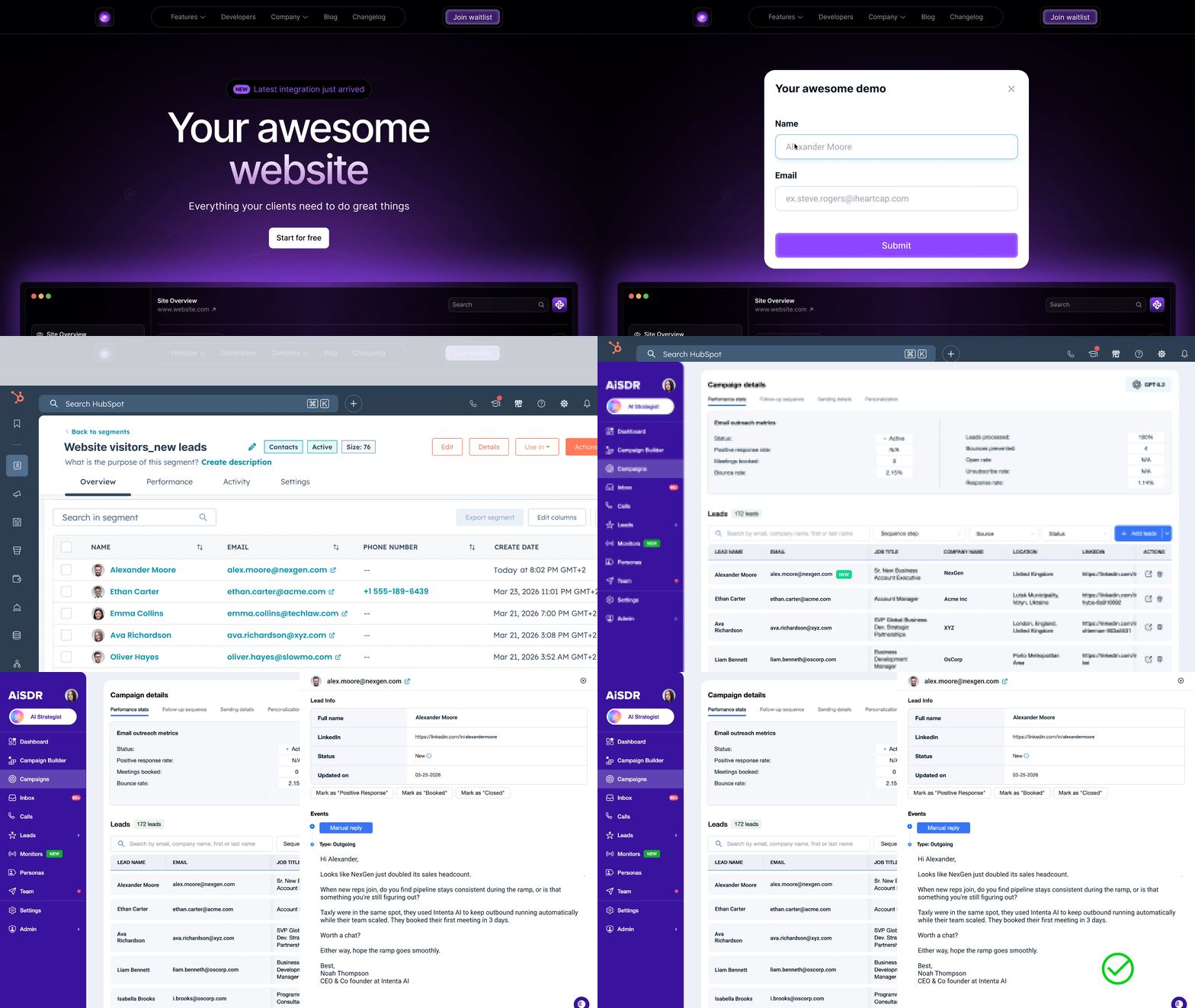
Source new leads and reach out to your HubSpot contacts with AiSDR. The AI researches each lead for buyer intent, sends researched outreach, and books meetings. Your CRM stays accurate without any manual work.





Booked with Enterprises






Double-digit response rate





First Meetings <14 Days




 Read full review




What you can do with AiSDR in HubSpot


How it works
Set up the integration. Pick what to sync. Launch this week.
Connect HubSpot
One-click integration. Pick the lists, contact properties, and activity triggers you want AiSDR to monitor.
AI analyzes your leads
AiSDR pulls historical data, company info, and recent activity from HubSpot to build context for every prospect. The AI also runs live web research to fill the gaps your CRM can’t capture.
Outreach goes live
Reach qualified leads fast with researched, personalized messages across email, LinkedIn, and calls. AiSDR handles replies, objections, and follow-ups until a demo’s on the calendar.
Everything you need to run outreach from HubSpot
AiSDR’s HubSpot integration goes deeper than a contact sync. Every feature is built to run outreach that respects your domain, brand, and buyer.

2-way HubSpot sync
Keep your CRM the source of truth without spending a minute updating it. AiSDR logs every send, reply, and meeting booked back to the contact timeline within minutes. You’ll always have the full picture when you need it.

Personalized sequences
Leads ignore generic messages, and ignored messages don’t book meetings. AiSDR writes a unique message for every prospect using their HubSpot data, recent activity, and live research. Each email reads like one of your salespeople wrote it.

Lead scoring & prioritization
Spend your time on the leads most likely to buy. AiSDR scores every contact for real buying signals and pushes the highest-intent ones to the front of the line, while low-fit contacts stay out of your sequences.


Activity-based triggers
Launch outreach the moment a lead visits your pricing page, downloads an ebook, or hits a key event. AiSDR catches the trigger in HubSpot and gets a relevant message in front of the prospect while their interest is still warm.

Multi-channel outreach
Combine email and LinkedIn in coordinated sequences, and sync call scripts for your upcoming call tasks. AiSDR keeps the messaging consistent across every channel so you run one coherent conversation across channels, not three disconnected ones.

Real-time analytics
Track pipeline, reply rates, positive reply rates, and meetings booked directly in your AiSDR dashboard or synced to HubSpot.
5 things you only get with AiSDR

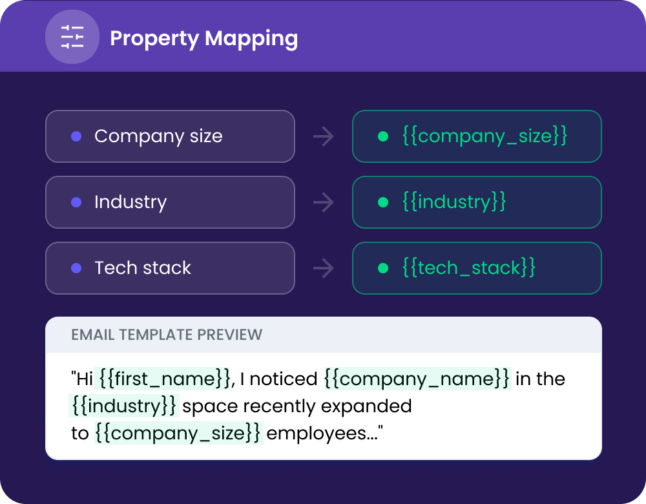
Sync any HubSpot property into AiSDR and use it in your outreach. Every message can draw on up to 3 properties, so messages reflect what you know about each prospect.
- Sync any HubSpot property (custom or default)
- Use it in emails, LinkedIn DMs, and calls
- Updates flow both ways, so HubSpot and AiSDR always match

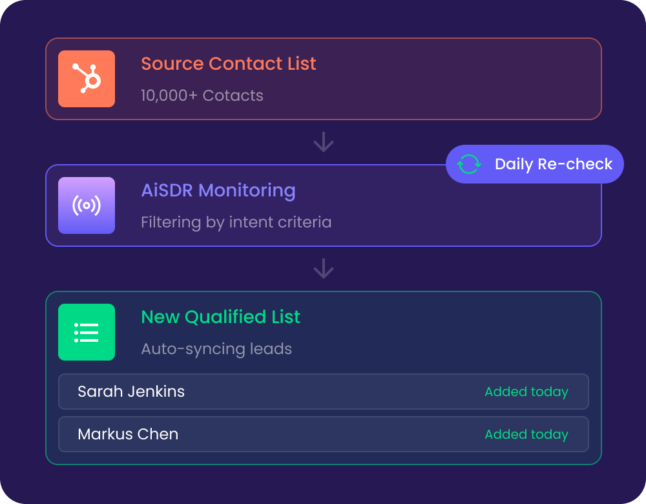
Point AiSDR at any HubSpot contact or company list and tell it what you’re searching for: job moves, funding rounds, new tools, or any other criteria. AiSDR checks the list every day and flags any leads that fit. You reach out the moment something changes.
- Works with both contact and company lists
- Watch for changes that suggest buyer intent
- Runs until you pause it

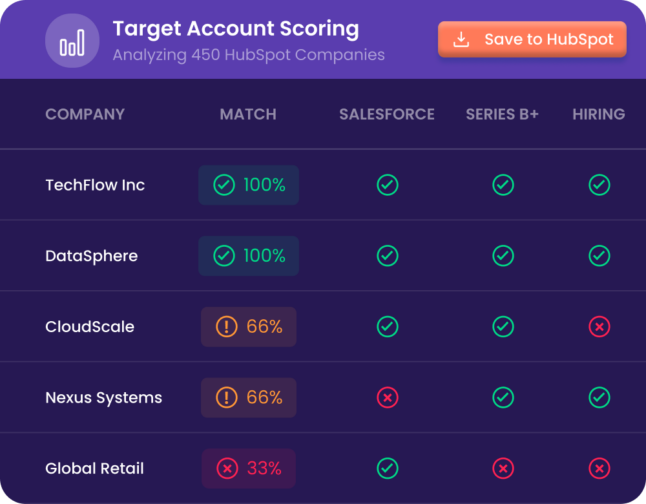
Tell AiSDR what a good-fit company looks like, and the AI scores your HubSpot lists against it. AiSDR digs across the open web for any public signals like leadership changes, hiring sprees, new office openings, market expansion, and product launches. The AI syncs them back to HubSpot, ready for campaigns.
- Hand off company research to AiSDR
- Score against up to 4 of your criteria
- Auto-save scored lists to HubSpot

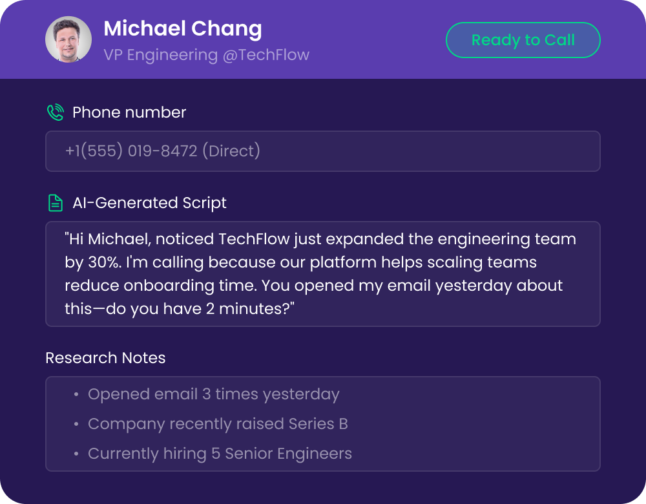
Pick up the phone already knowing who you’re calling and why. AiSDR creates call tasks in HubSpot complete with scripts and research notes, so your team connects email outreach to live conversations without the busywork in between.
- Create call tasks based on engagement
- Get researched talking points for every lead
- Carry email results straight into a live call

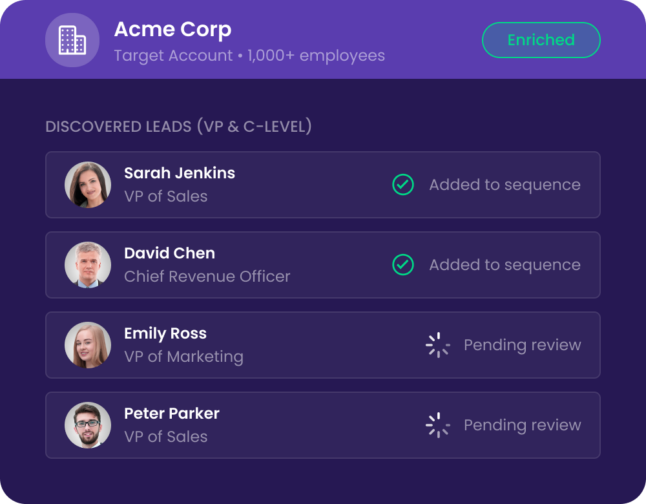
Turn your list of companies you want to win into people you can actually book calls with. Tell AiSDR which job titles and personas you’re targeting, and it finds the right buyers inside each account, fills in their details, and syncs them to HubSpot so you can reach out.
- Find contacts by specific job titles within target accounts
- Fill gaps in contact and company data automatically
- Sync new contacts directly to HubSpot

Outreach controls for fast-growing teams


Trusted by top revenue teams


Go deeper where it matters to you


Frequently Asked Questions
What does the AiSDR for HubSpot integration cost? 
There’s no extra cost for connecting your HubSpot sales tool to AiSDR. So long as you have an active subscription, you’ll be able to take advantage of HubSpot automation tools in AiSDR.
Which HubSpot tier do I need?
There’s no tier requirement to use AiSDR’s AI for HubSpot integration, so you should choose the HubSpot tier that works best for your business.
Is there a limit to lists/contacts I can process?
There’s no limit to the lists and contacts you can process and assign to campaigns. Your only limit is the number of emails you can send each month.
Are there any delays in data handover?
Generally, no. In a worst-case scenario, data handover may take a few minutes as AiSDR pulls leads and data from HubSpot. If you make any changes to data in HubSpot sales tools or AiSDR, the data will be quickly synced.
Will AiSDR tell me when a list finishes syncing?
Yes. Once a list has been fully synced and enriched from HubSpot, you’ll receive an automatic email notification.
How many custom properties can I add from HubSpot?
You can add as many properties as you need to create a HubSpot AI email. However, every time you create a campaign, you will be asked to choose no more than 3 properties for HubSpot AI writing personalization.
I’m missing lead data. Will AiSDR help fill it in?
Absolutely! Whenever you sync a list from HubSpot sales enablement tools to AiSDR, you can have AiSDR automatically enrich leads and fill in any missing gaps in the data. By default, we fill in the fields Company name, Company website, Industry, Location, Job Title, and LinkedIn.
Our AI landed
meetings for clients
with these giants
were out of reach