









AiSDR Product Spotlight #1: Website Visitor Tracking, Bounces Prevented Counter

December has us all in a holiday mood.
For many startups, it means slowing down for a breather. But for AiSDR, it’s high time to push-push-push our product updates to make sure you close 2024 and start 2025 with ironclad powerful outreach.
And this time of year, I decided to lift the curtain a bit and show you what makes us one of the fastest-shipping teams and the platform with 10+ new feature releases every week.
Introducing AiSDR’s New Year’s Countdown!
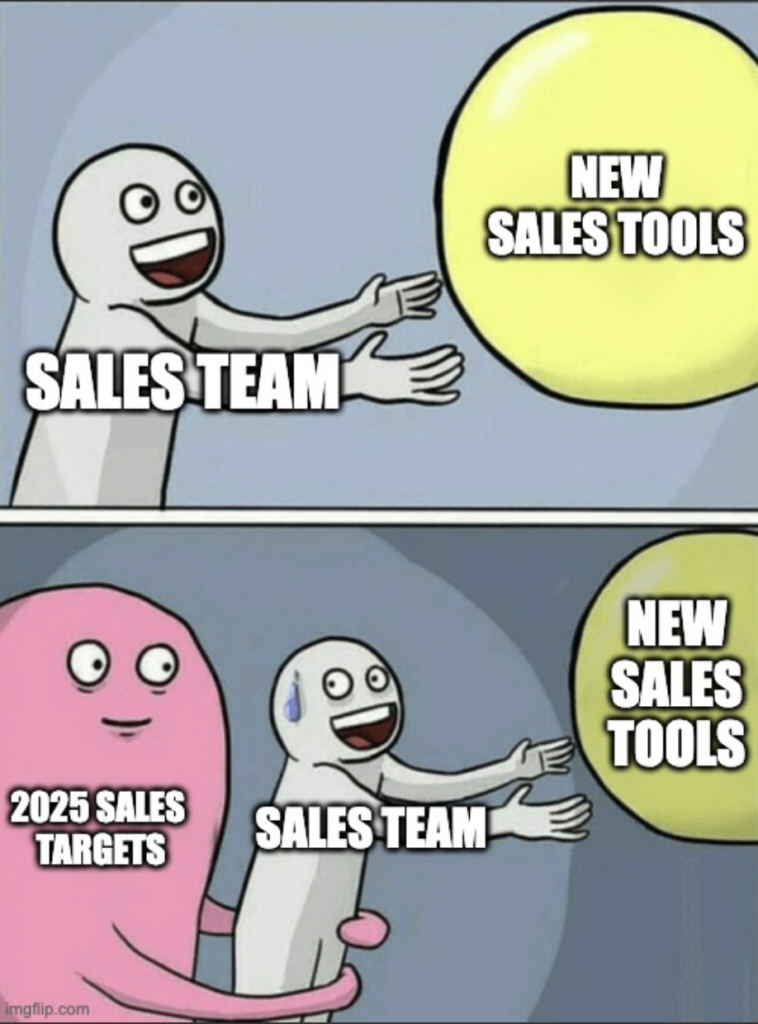
So what does it mean?
Instead of our usual monthly updates, I’ll be dropping new product feature overviews every week.
Because that’s not only how fast we roll, but it’s also how fast we make changes to our platform all year round.
So in December, we’ll be a lot more vocal about sharing:
- All of the new features we release weekly (with gifs, videos, and holiday cheer 🌲)
- Tweaks to our product to improve your experience
- Tips and tricks on how you can use these updates in your everyday outreach
- Teasers for upcoming features
We’ll be dropping a (1) weekly newsletter, (2) weekly blog on Friday, and (3) a few updates on LinkedIn and Twitter. Make sure to check it out, and follow us on socials (*wink-wink* 😉).
[Newsletter] AiSDR’s New Year’s Countdown

And without further ado, here goes our first drop of December!
Website visitor tracking
Ever wanted to see who’s visiting your website, and have all the data handy to shoot them a message before they forget about checking out your brand?
My dream exactly.
And now we can.
With AiSDR’s Website Visitor Tracking feature, you can have the AI collect the visitors of your website pages, and look up their data so that you can start sending them relevant messages while they’re still warm.
After all, no one likes a leaky pipeline.
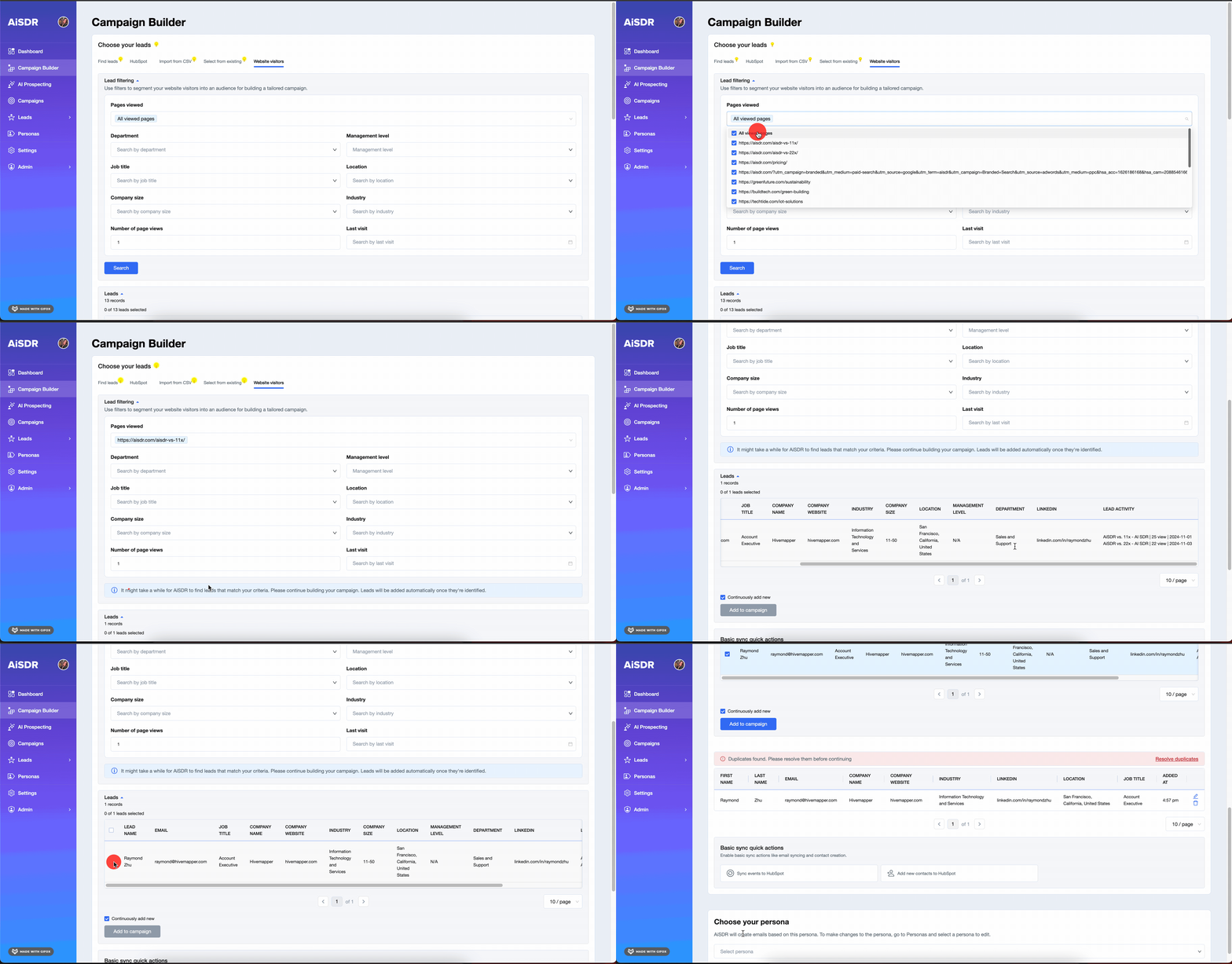
How to use AiSDR website visitor tracking
Step #1: Install the pixel script on your website. You can do this manually or use Google Tag Manager (like I did).

Step #2: Give AiSDR a little time to collect data. Like Google Analytics, this feature doesn’t work retroactively, so it needs some time to collect and enrich visitor data.
Step #3: In the Campaign Builder, click “Website visitors”. By default, AiSDR will show you a table with an unfiltered list of every prospect who’s checked out at least one of your pages, at least once. This makes it easy to identify B2B website visitors who are already showing interest.
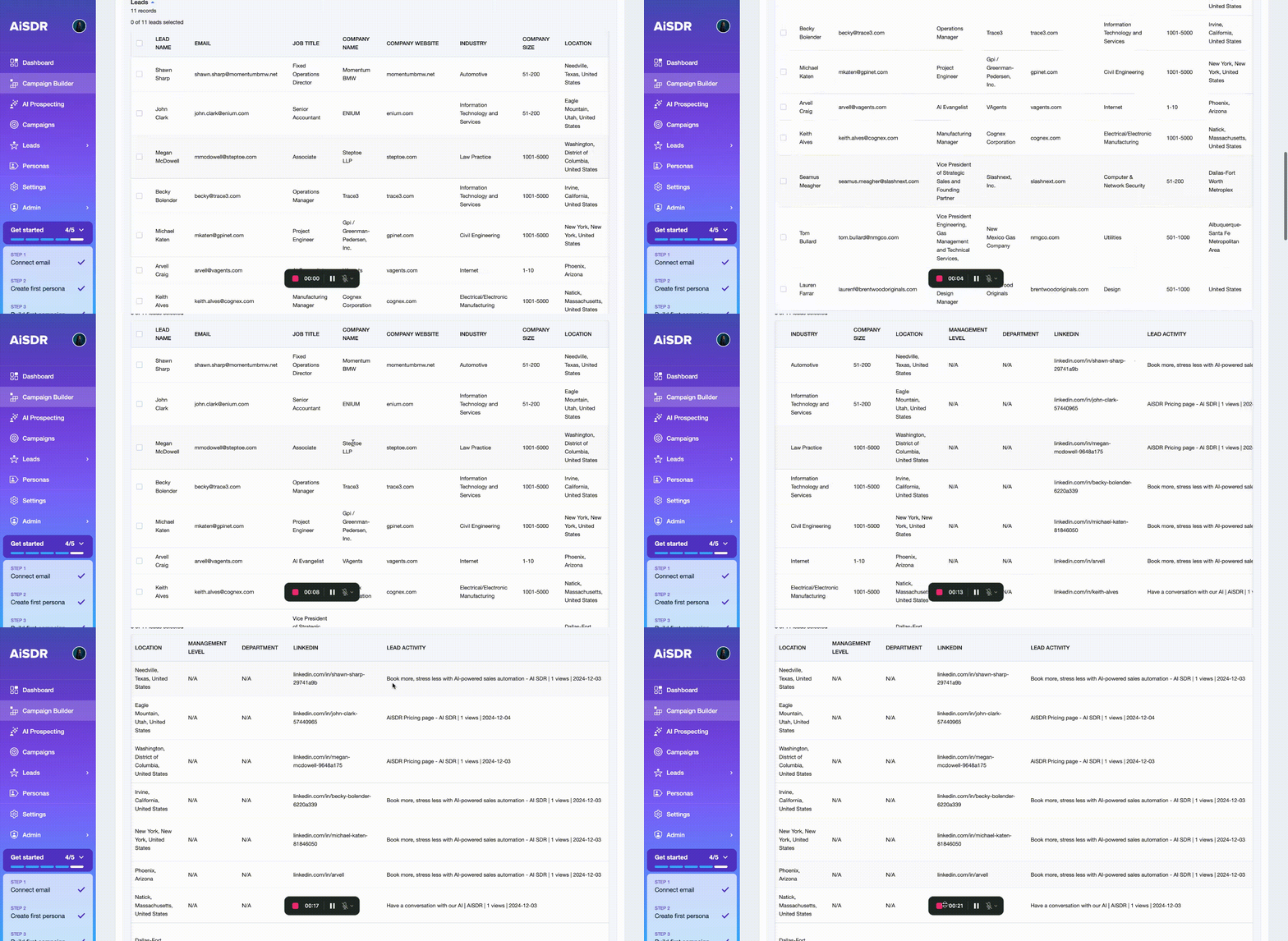
AiSDR will automatically look up and show the following info:
- Lead name
- Email address
- Job title
- Company name
- Company website
- Company industry
- Company size
- Company headquarters
- LinkedIn profile URL
- Pages they visited, when, and how many times
Unlike many website visitor tracking tools that only provide raw traffic data, AiSDR enriches every record so you know exactly who is behind the visit.
Step #4 (a): You can select all the leads and add them to your campaign right away…
Step #4 (b): … OR (and this is how I’d recommend approaching this), you can filter the leads to make sure your outreach really resonates with each prospect and aligns with where they are in their sales journey.

- Identify leads that match your buyer profile using the filters (Job title, Management level, etc.).
- Align the companies these leads are coming from with your ICP.
- Spot hot leads by filtering out folks who viewed several pages on the website.
- Break down high-value page visits and low-value page visits. For instance, blog visitors are probably not as interested in your solution as product page visitors.
Step #5: Mix, match, experiment, and A/B test!
The cool thing about Website Visitor Tracking is that it gives you a plethora of data to test across multiple sales plays. From segmenting hot leads to refining messaging by buyer profile, there is endless room for experimentation.
This is what makes AiSDR one of the best website visitor tracking tools, because it does more than show you traffic. It helps you spot patterns and scale qualified visits into meaningful outreach opportunities.
Here are a few tips on how to best use this feature:
- Avoid the spray-and-pray approach. Instead, prioritize product champions or decision-makers. AiSDR will track a lot of visitors, but not everyone has buyer intent. There’s always someone who’s just browsing
- Build hypotheses for why someone visited a specific page but didn’t convert. Then try to validate and address them through outreach.
E.g. A prospect visits your pricing page but doesn’t start a subscription → Send them a message asking about their available budget and offer a trial as a PoC or a limited volume discounted option.
- Launch a separate campaign for each of your most high-intent pages.
E.g. When a lead checked out a demo page but didn’t book a meeting vs when they watched a product tour but didn’t reach out afterwards.Create separate messaging for each of these lead groups.
- Break down campaigns by geography. AiSDR sticks to the sending schedule you select. At the moment, AiSDR doesn’t support adjusted time sends, so if you’re adding leads from multiple time zones to one campaign, chances are your messages will reach some of them at odd hours.
- Keep tabs on the unfiltered data of your page visitors and check out the lead table every once in a while. This will help you spot demand patterns, market expansion opportunities, and which pages drive the most interest and value for your sales.
Bounces Prevented Counter
Outbound prospecting and outreach always go hand in hand with bounce risks.
And while we can’t do anything to protect against soft bounces (i.e. being on PTO, out of office, or recently quitting their job), preventing hard bounces is one of our fortes at AiSDR.
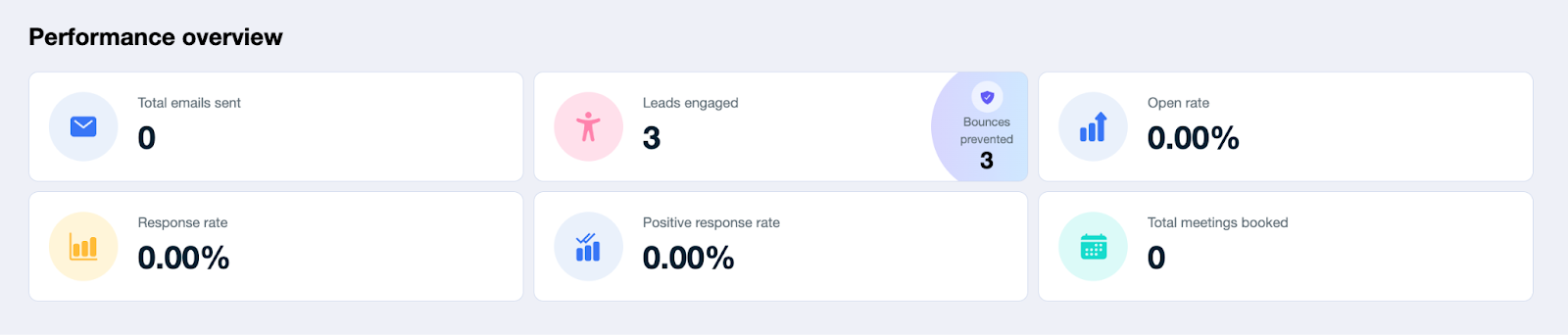
And while we’ve been running 3x bounce checks for ALL the data for EACH prospect you added to your campaign in the background (you knew we do that, right?), we’ve added a tiny feature that shows you how well AiSDR does it.
On the Dashboard next to the number of leads you’ve engaged, we now show you how many bounces AiSDR prevented from happening. Simple as that.
Why is it cool?
While it might seem like a no-brainer, like “yeah, you prevented bounces, so what”, there’s more to this than meets the eye:
- The number of bounces our AI prevents helps you assess the quality of data if you’re syncing your own leads from HubSpot or pushing CSV files you got from other vendors onto the platform.
- Bounces impact your deliverability and mailbox health. By seeing how many bounces were prevented, you can remain certain your outreach domains are doing good while your emails are landing in your prospects’ inboxes.
Like all other stats on the Dashboard, you can see the Bounces Prevented counter for all of your campaigns or drill down into a specific campaign to assess the data quality and performance.
🤫 Next week’s sneak peek
Worried about accidentally going over your email credit limit? Or missing a heads-up from your dedicated Outreach Success Manager?
We’re working on a quick hack that will prevent you from any unsolicited overage. Stay tuned!
From traffic to pipeline 💡
FAQ
What is website visitor tracking?
Website visitor tracking is the process of identifying the people or companies who land on your website. Instead of treating traffic as anonymous, tracking reveals which visitors match your ICP, what pages they view, and where they drop off.
While most tools only show you which companies are visiting, AiSDR goes a step further by de-anonymizing that traffic and showing you enriched contact details like names, emails, job titles, and LinkedIn profiles. This turns hidden intent into visible signals you can use for smarter outreach.
Which tool is best for website visitor tracking?
The best website visitor tracking tools are the ones that go beyond raw traffic data and make the insights directly usable for sales. It is not enough to know that a company visited your site. The real value is in seeing which specific people it was, what they looked at, and having verified ways to reach them.
AiSDR does exactly that by combining contact-level enrichment with intent signals so your team can treat website visits as real opportunities rather than anonymous clicks.
How to do website visitor tracking?
You start by adding a short code snippet or pixel to the pages you want to monitor. We recommend just placing the code in the head section across the entire website to track all visits, and then just filter by pages you want to track for each campaign.
Once installed, the platform collects and enriches visitor data over time. From there, you can use those insights to guide your outreach. Focus on high-intent visitors, such as those who spend time on product or demo pages, and tailor your messaging to match their buyer journey.
With AiSDR, you not only see who the visitors are but can use the AI Persona Builder and fine-tune your outreach on the fly, making every touchpoint hyper-relevant.
Previous AiSDR updates:




See which features we launched this week in AiSDR
 Summarize with
 ChatGPT
 Claude
 Perplexity
 Grok
Grok 
 Google AI