








AiSDR Product Spotlight #54: AI Account Scoring for Salesforce

Lead scoring tells you which accounts are worth investing your time and resources into right now.
Rather than chase every company in your CRM, you focus only on leads that match your ICP, have the budget, and are in the market. And AI-powered scoring helps you get this done much faster. You define your criteria, run the analysis, and get a prioritized list in minutes.
HubSpot users have been doing this in AiSDR for a while now: scoring thousands of accounts, filtering by fit percentage, and focusing outreach on the best opportunities.
Now, we’re extending this ability to our Salesforce users as well.
🎯 AI account scoring for Salesforce
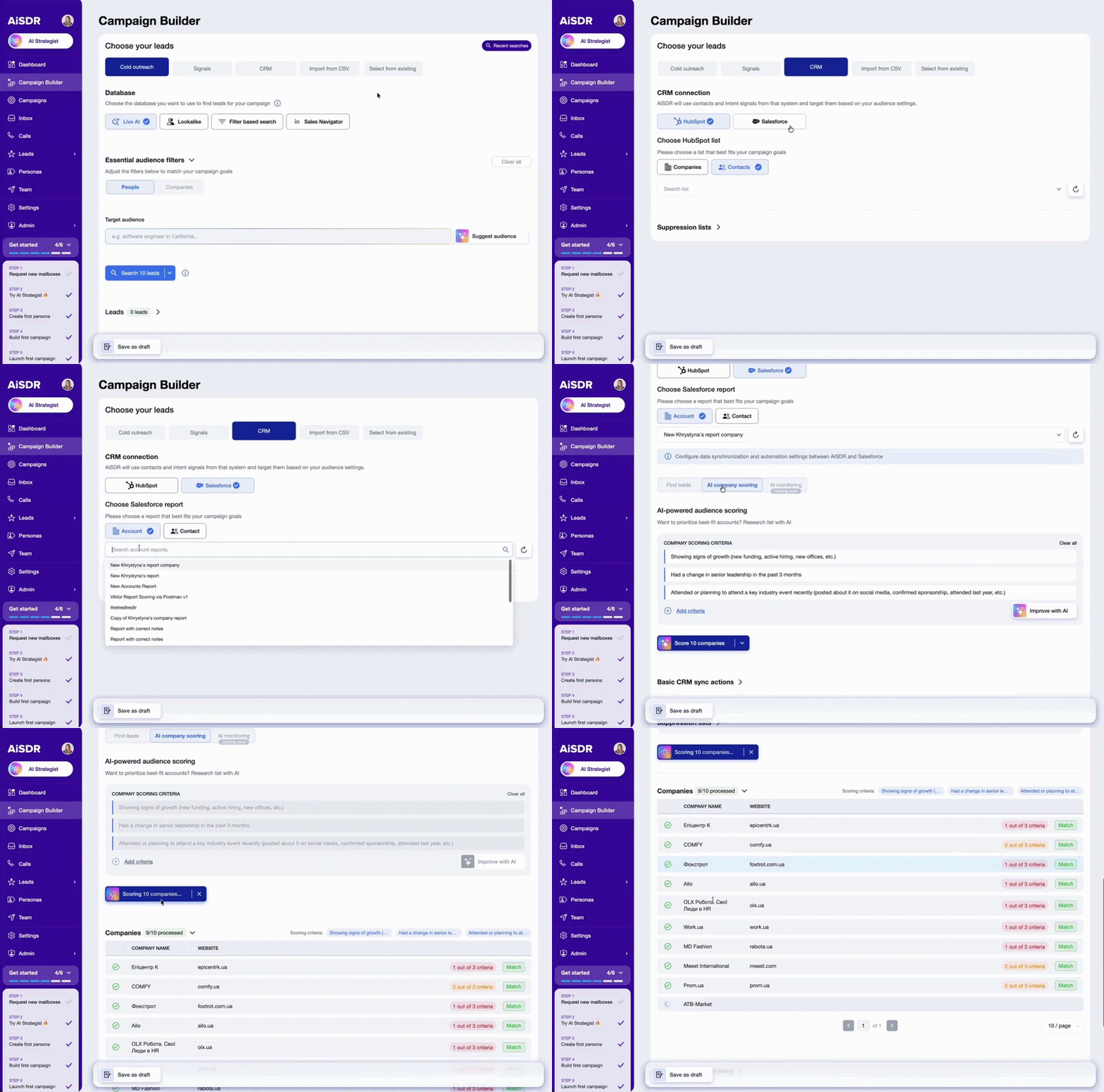
Sorting through 10K+ accounts in Salesforce is no easy task. When every account looks the same on screen, your reps burn half their day playing ‘data detective’ just to find a single reason to pick up the phone or send an email.
It’ll take you weeks to review all of them manually. AiSDR’s AI account scoring takes minutes.
How it works
Define 1–4 criteria that match your ideal customer profile:
- Company size
- Industry
- Tech stack
- Funding stage
It can be whatever matters to your business. Or you can use our predefined criteria to get started faster.
AiSDR analyzes your Salesforce accounts against those criteria and assigns each one a fit percentage. The higher the score, the better the match.
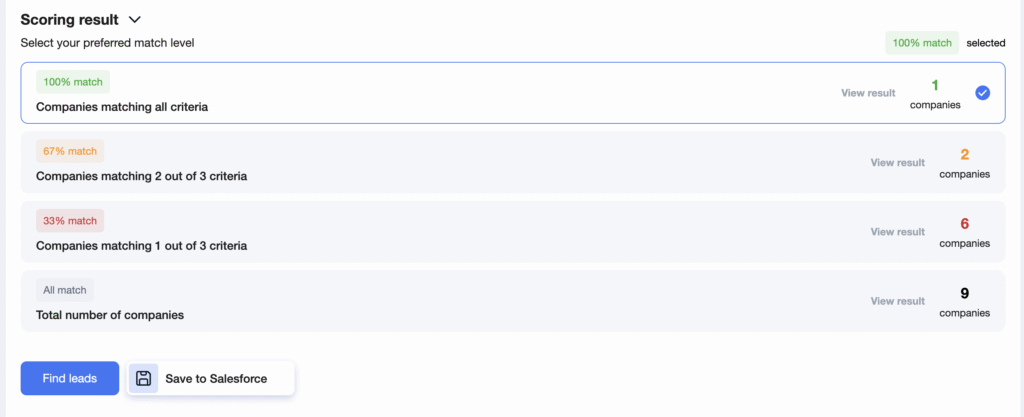
You can score companies one by one or run scoring across your entire Salesforce list at once. The results appear as tabs organized by score percentage, so you can quickly filter for your best opportunities.
What you get
Every account scored shows its fit percentage and the reasoning behind it. You’ll see which criteria it matched, which it missed, and why it got that specific score.
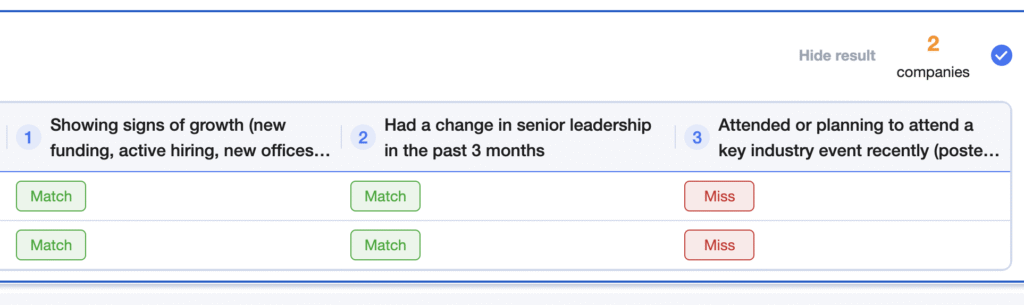
Scoring data syncs directly to Salesforce.
Add the scoring fields to your Salesforce layout, and they’ll appear right in your account view. Details about each company scored will also show up in the Notes section.
Some things to know
Scoring costs 1 search credit per company, and results are cached for one day.
If you’re using “Add continuously during lead search,” it works off your list of companies scored. And to sync everything properly, the person setting up the integration needs the rights to create permission sets and custom properties in Salesforce.
Why this matters
You stop chasing accounts that won’t convert anytime soon and focus on ones ready to buy now.
Imagine you’re planning a new campaign targeting enterprise healthcare companies with 500+ employees. Simply define those criteria in AiSDR, score your Salesforce list, and get back accounts ranked by fit in the time it takes you to brew your morning coffee ☕
The top 50? 90%+ match. Your team knows to start there.
The bottom tier? Save them for later or for a different play.
Blog Spotlight: How to Get Generative AI to Score Your Leads
(Read the full post → How to Get Generative AI to Score Your Leads)
Not all leads are created equal.
Some are ready to buy. Others are years away. The challenge is figuring out which is which before you waste time on the wrong ones.
Generative AI changes how scoring works. Instead of rigid point systems based on outdated rules, AI evaluates leads against your actual ICP criteria and explains why each one does or doesn’t fit.
Check out the full guide to see how AI scoring works, what criteria matter most, and how to use it to prioritize your pipeline.




Discover AI account scoring for Salesforce in AiSDR
 Summarize with
 ChatGPT
 Claude
 Perplexity
 Grok
Grok 
 Google AI