
AiSDR Product Spotlight #50: Centralized Inbox & New Dashboard Metrics

Running outbound at any volume means you’re constantly asking three questions:
- What’s happening? (Which leads are replying?)
- What’s working? (Which campaigns are converting?)
- What’s the impact? (What revenue are we generating?)
Most sales platforms answer one or two of these.
Maybe you see reply rates but not which conversations need attention. Or you track engagement but can’t connect it to closed deals.
Either way, the result is you end up flying blind.
Our latest AiSDR releases help close that visibility gap. From the moment a lead replies to the dollar amount that hits your pipeline, you get the complete picture.
📬 Inbox: Your central hub for every lead conversation
Imagine you’re running five campaigns:
- Campaign A has 12 new replies.
- Campaign B has 3 new replies.
- Campaign C has a hot lead buried in a thread from last week.
And let’s not even talk about the other two…
Where do you even start?

Before today, you’d have to switch between your email, LinkedIn, and the AI SDR to piece together which conversations matter most. High-intent leads sit unanswered while you sort through noise.
Not anymore. Starting today, every reply from every campaign lives in one place.
What’s in the Inbox?
Every lead reply from every campaign you’re running. We’re talking email responses, LinkedIn messages, conversation threads – all unified in a single view so you can see what matters and act fast.
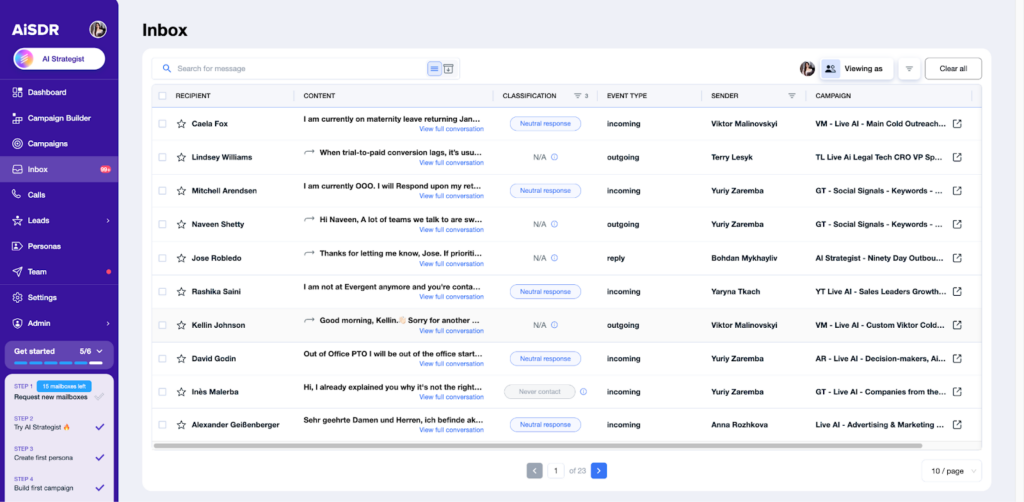
Here’s what you can do with Inbox
- See all replies in one view – Every conversation from every campaign, unified
- Filter by campaign – Instantly spot which plays are driving engagement
- Reply across channels – Respond via email or LinkedIn directly when a connection or thread already exists
- View full threads – Click any row to see the complete conversation and take action
- Get daily digests – Active users with important unread conversations get a summary email
Why it’s cool
Instead of giving you another list of reasons, here’s a little story.
It’s Tuesday morning. Sarah (your SDR) opens the Inbox and filters for her “Enterprise Q4 Push” campaign.
Three replies pop up immediately.
Two are objections she can handle with a quick response. The third? A VP asking for pricing and availability for a January kickoff.
Sarah clicks into the full thread, sees the lead has opened the last four emails, and replies within minutes while the conversation is hot.
What was life like before AiSDR’s Inbox?
That VP’s reply might have sat in her general email folder for hours, buried under newsletters, internal threads, and noise from other campaigns.
📊 Campaign performance at a glance
Do you know which of your campaigns is performing best right now?
If you had to dig through multiple views or export data to answer that, this update is for you.
You need one dashboard that shows the full picture. Not just your top performers, but every campaign, every metric, every signal that tells you where to double down and where to cut your losses.

So, without further ado, here’s a bunch of cool new metrics you can now track in your dashboard:
- Positive response rate to quickly spot the campaigns that convert best
- Completion status to understand how far each campaign has progressed
- Personas to compare how different audience segments respond
- New contacts added to track whether a campaign is consistently getting fresh leads
Why it’s cool
Say you log in and sort campaigns by positive response rate.
- “Healthcare Decision Makers” is at 18%
- “Tech Startups” is at 4%
You drill into Healthcare, see VPs are responding 3x better than directors, duplicate the campaign with VP-only targeting, and pause the underperforming play.
Four minutes. No spreadsheets. Just clear data and immediate action.
💰 Deals and pipeline metrics to see your revenue impact
Last but not least…
Even if reply rates look good and meetings booked is soaring, your VP of Sales wants to know two things:
- How much pipeline was generated?
- Which campaigns are turning into closed deals?
Until now, connecting AiSDR activity to actual revenue meant manual tracking, spreadsheet gymnastics, or just… guessing.
We got tired of feeling cringy, so we added two new performance metrics:
- Pipeline generated – Total value of all deals tied to your AiSDR contacts, across every stage
- Deals won – Closed deals that turned into revenue
Why it’s cool
Imagine you’re in a leadership meeting and someone asks: “How’s AiSDR performing this quarter?”
All you need to do is pull up the dashboard.
$847K in pipeline generated? $203K closed? “Enterprise Outbound” drove $340K alone?
You show the screen and hear: “Double down on Enterprise. Let’s talk budget.”
Blog Spotlight: Guide to Outbound Sales
(Read the full blog → Your guide to outbound metrics)
You’re tracking open rates, response rates, and meetings booked. But are the numbers you’re seeing actually good?
Without benchmarks, you’re guessing. With them, you know exactly where you stand and what needs to change.
Find out which essential outbound metrics you should be tracking, plus industry benchmarks to measure your performance against.




Central inbox to answer leads from AiSDR & new pipeline metrics
 Summarize with
 ChatGPT
 Claude
 Perplexity
 Grok
Grok 
 Google AI