8 Best AI Email Assistants for Sales Teams

Most sales teams lose 70% of their week to manual research and data entry instead of selling.
But teams can’t monitor buyer signals around the clock, meaning most leads cool down before you can even engage. Worse, every minute of delay gives your competitors a head start to win the deal.
AI email assistants bridge this gap by launching outreach the moment intent is detected. They combine human-level quality with the speed of automation, augmenting sales teams so they can focus on actual selling.
Tl;dr summary
- Inbox overload and slow lead lists drag teams down, so this roundup highlights AI email assistants proven to cut busywork and keep outreach moving.
- AiSDR stands out with buyer intent signals like LinkedIn engagement, hiring, funding, tech-stack changes (and more), fast replies, inbox warming, Live AI, and a 300M+ contact database for uncovering high-intent leads.
- Buyers should match each tool to their workflow, check integrations, and compare true total cost.
What is an AI email assistant?
An AI email assistant is an AI-powered tool that writes, personalizes, and sends outreach.
Unlike past-era outreach software, AI email assistants need little human input and no constant oversight. You can train the assistant on your sales persona, and it will adopt your writing style.
AI email assistants are more than copywriting bots. An agentic AI for email plugs into your CRM and sales tools, read buyer signals, and run outreach workflows. They’re always on the lookout for leads that match your ideal customer profile (ICP). Once a prospect demonstrates strong buyer intent, the tool reaches out to them automatically.
Email writing automation
The assistant drafts cold emails, follows up, and replies to messages matching your tone and ICP. It can A/B test subject lines, tweak messaging by persona, and keep everything on-brand.
Prospecting and personalizing
AI assistants enrich leads with firmographic and behavioral data, scraping it from the web. They use this data to tailor each message to the prospect’s role, industry, and recent activity.
Multi-channel orchestration
Many agentic AI assistants don’t stop at email. They coordinate sequences that mix email, LinkedIn, and call scripts so teams meet buyers where they are.
AI assistants also keep the activity timeline in sync across tools so a rep never double-taps a prospect with conflicting messages.
Agentic processes
Think of the assistant as a junior SDR who never forgets to follow up. It builds and updates sequences, chooses the next best touch, and sends nudges at the right time.
Agentic AI assistants can also book meetings, reschedule when things slip, and route hot replies to the right owner, all without a human manager babysitting every step.
Free guide
Benefits of AI email assistants for sales leaders
Sales leaders embrace AI email assistants. And why not if they get more meetings booked at a lower cost, while freeing reps from grunt work?
Faster outreach
An AI email assistant can spot a prospect’s online activity and reach out in minutes. A human rep is more likely to take action hours or days later, when the lead has already cooled down.
AI assistants work 24/7, without breaks or days off. That’s how they bring missed sales opportunities to near-zero.
Higher response rates
Senders who personalize every email see 2-3x higher reply rates than those using basic templates.
A human rep physically can’t personalize more than a few dozen emails on a typical workday. An AI assistant can handle several hundred, adding context and personal connection to each email to elicit replies.
Reduced workload
Salesforce data shows that reps spend only about 28% of their week actually selling, with the rest eaten by admin tasks like manual data entry and email prep.
AI assistants can handle the grind, freeing the reps to do more sales calls and preventing burnout.
Lower customer acquisition cost (CAC)
If your AI assistant is scoring, enriching, and prioritizing accounts, then only the best-fit prospects get human time. That means you’re closing more deals, and the acquisition cost is spread over more revenue.
Automated meeting scheduling
AI assistants can drop smart booking links into emails, propose times, handle reschedules, and sync calendars without human help.
This matters in a world where sales teams juggle an average of about 10 buyer communication channels. Smoother scheduling means fewer missed opportunities and less friction between interest and a live call.
Objection handling with AI
AI assistants can suggest or draft objection-handling replies based on what has worked across similar deals and customers.
That’s especially valuable when you’re targeting a new audience, which your team hasn’t previously dealt with. AI assistants plug into the pool of other companies’ experience and use it to polish your campaigns.
Top 8 AI email assistants in 2026
Here’s a rundown of some of 2026’s top AI email assistants that can augment your sales team now.
AiSDR
AiSDR is an AI sales platform that acts as your best salesperson with radar while automating your outreach until a meeting gets booked. By targeting active pain over profiles, AiSDR skips the “spray and pray” approach of other AIs to convert in-market buyers at 3x the industry average.
AiSDR can also consolidate your entire GTM stack into one system that thinks before it sends, safeguarding your brand reputation while driving measurable results.
Price: $900 per 1,200 messages per month
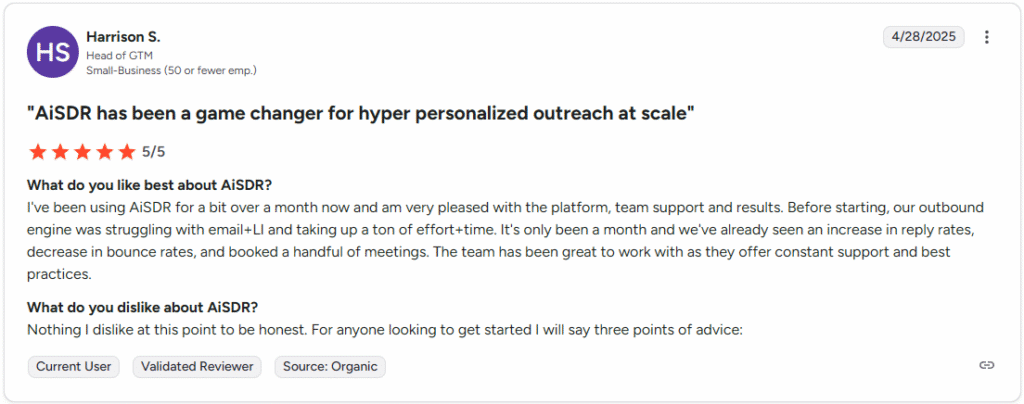
G2 score: 4.7 (76 reviews)
Key features
- AI Strategist that analyzes your website and goals to create GTM campaigns with messaging angles and audience niches you can launch in one click
- Live AI search that identifies in-market leads using triggers like LinkedIn activity (profile views, engagement), recent news, and role changes
- Multimedia outreach sequences across email and LinkedIn, using AI video, voice notes, and memes
- Autonomous response handling by the AI to answer incoming messages, questions, and objections within 10 minutes
- AI-powered account scoring of contacts in HubSpot and Salesforce CRM
- Flexible sequence builder that lets you construct outreach sequences exactly how you want them
Pros
- 2-way integrations with HubSpot and Salesforce
- GTM engineering and customer support ready to help at any moment
- Turnkey email infrastructure done for you
- Usage-based fee and unlimited seats
- Fast setup and short learning curve
- Handles communication until a meeting is booked
- Messages tailored to match your tone of voice
Cons
- No AI voice agent for calls
- No integrations with Pipedrive or Zoho
Book more, stress less with AiSDR
Lavender
Lavender is an email intelligence platform that helps SDRs write better by scoring emails and providing suggestions on how to improve and personalize each message.
Price: $27-$45/month, with a free plan and a custom team plan available
G2 score: 4.8 (62 reviews)
Key features
- Scores your emails, evaluating how likely they are to get a reply
- Surfaces prospect data and insights from your CRM and gives tips on how to personalize your message for better engagement
- Drafts emails based on the main points you provide
- Optimizes emails for mobile screens
Pros
- Real-time feedback on emails
- Email grading feature
- Sentiment analysis
- Integration with Hubspot, Apollo, Salesloft, Gmail, and Outlook
Cons
- No possibility to add team members to the dashboard for collaboration
- No option to compose emails inside Lavender and save them in folders
- No email templates
- The grading system gives lower scores for commonly used phrases, with no option to add exceptions
- No mobile version
Jasper
Jasper is an AI content platform used by sales teams as an email-writing copilot for outbound and follow-up sequences.
Price: $39-$59 per user/month
G2 score: 4.7 (1,264 reviews)
Key features
- Allows reps to write and edit emails directly inside Gmail and Outlook through a browser extension
- Uses over 50 templates for cold outreach, intros, follow-ups, and nurture emails
- Offers a choice of custom brand voices to keep emails on-brand across the team
- Suggests sales-oriented prompts to generate personalized pitches and outreach emails based on lead info
- Supports multiple languages
Pros
- Strong at turning rough notes into polished, on-brand sales emails
- Works where reps already live: in Gmail, Outlook, and browser
- Helpful if marketing and sales want one shared AI that uses the same brand voice across channels
Cons
- No built-in sequencing, inbox rotation, or deliverability management
- Per-seat pricing, which can get high for large SDR teams
- Very basic analytics and campaign management
Copy.ai
Copy.ai is an all-in-one AI copy solution that works across the tech stack to validate contacts and provide smart insights for targeted outreach campaigns.
Price: From $29/month
G2 score: 4.7 (181 reviews)
Key features
- Scrapes web data about your prospects to validate and flesh out contacts that match your ICP
- Researches a prospect’s job history, interests, motivations, and pain points to create a compelling context for a cold email draft
- Analyzes your brand’s tone of voice and value props and uses them to generate professional, engaging content
Pros
- Relevant and detailed data on prospects and accounts
- Content generation for emails, social media, blogs, etc.
Cons
- Limited tone-of-voice options
- Some generated outputs are plagiarized or pulled from unverified resources and have to be double-checked
Regie.ai
Regie is a generative AI tool for sales teams that sources leads, warms them based on engagement signals and intent, and automates the outbound email strategy. Regie supports autopilot and copilot workflows to take your AI sales prospecting to the next level.
Price: Custom pricing
G2 score: 4.4 (337 reviews)
Key features
- Personalizes messaging with your persona, priority data sources, and email body and subject line prompts
- Automatically prioritizes emails, dropping disengaged prospects off your list
- Analyzes lead engagement to create a smart follow-up sequence leading your prospect to book a meeting.
Pros
- Consistent communication with prospects on autopilot
- Automation and personalization of emails based on LinkedIn profile
- Creation of personalized outreach sequences
- Automated optimization feature
- Real-time monitoring and reporting tools
- Quick search of relevant information about the prospect
- Trigger-based emails
- Ability to get lead emails directly from LinkedIn
Cons
- Few help resources on the website
- Bumpy interface
- Limited customization
- American messaging style that can’t be changed for international markets
Drift Email
Drift Email is Drift’s AI-assisted email reply management layer. It sits on top of your outbound programs and cleans, classifies, and routes replies so humans only touch the high-intent ones.
Price: $2,500/month
G2 score: 4.4 (1,254 reviews)
Key features
- Classifies inbound replies from campaigns into categories (human reply, out of office, unsubscribe) and bounces using rules and AI
- Automatically enriches contacts from out-of-office messages and signatures
- Invalidates outdated contacts and processes unsubscribes for compliance, keeping marketing lists clean
- Routes real human replies to the right rep for follow-up
Pros
- Saves marketing ops and SDRs from wading through thousands of auto-replies
- Useful for high-volume outbound where list hygiene and compliance really matter
- Tight connection to Drift’s conversational marketing stack (if you use their chat and routing)
Cons
- Focused on reply handling, not on composing or sequencing outbound emails
- Pricing and packaging are enterprise-leaning
- Recently tied to a widely reported OAuth token breach involving Drift Email integrations, raising concerns about its security
Flowrite
Flowrite is an AI email-writing assistant that turns short prompts into full emails. It lives as a browser extension over Gmail and other tools.
Price: Custom pricing
G2 score: N/A
Key features
- Offers preset templates for cold outreach, follow-ups, and replies, tuned for sales and customer-facing communication
- Lets you pick tone, length, and style for your messages
- Integrates into daily writing workflows instead of forcing reps into a new dashboard
Pros
- Efficient for overcoming writer’s block
- Good fit when you want writing help, not a full sales engagement platform
- Lightweight extension model with minimal setup and training
Cons
- No native sequencing, reporting, deliverability tooling, or multi-mailbox orchestration
- You still depend on whatever email platform you plug it into for send limits, tracking, and metrics
- The product has been repositioned under Maestro Labs, so the roadmap and long-term focus may shift toward broader writing use cases, not just sales
Salesforge
Salesforge is an AI-driven outbound sales platform that combines cold email infrastructure, multi-channel sequences, and an AI SDR that helps research, personalize, and send at scale.
Price: $48-$96/month
G2 score: 4.6 (218 reviews)
Key features
- Connects unlimited mailboxes so you can scale sending volume without buying more seats
- Uses automated warm-up and deliverability control via Warmforge and Mailforge to protect the domain reputation
- Personalizes cold emails and sequences using account and intent data
- Drops all replies into a unified inbox to manage them in one place
- Finds and enriches B2B leads via Leadsforge
Pros
- Strong combination of deliverability, mailbox scale, and AI personalization
- Unlimited mailboxes
- Easy setup
- Natural-sounding AI emails
- Responsive support
Cons
- Reporting lacks depth
- API access limited to more expensive tiers
- Multi-channel capabilities can feel heavy
Pitfalls to avoid with AI email assistants
As helpful as they are, AI email assistants do have their downsides.
Some AI email assistants need guardrails and careful prompting, otherwise they can damage your outreach, reputation, and deliverability.
Here are some common pitfalls you’ll want to watch for.
Over-reliance on templates
If your AI uses the same template over and over, your outreach turns into white noise. Prospects see the pattern in three emails and start ignoring them, or even marking them as spam.
Have your reps provide instant feedback to AI. When a draft feels repetitive or robotic, they should point that out and have the AI tool revise it. This problem can usually be fixed by adding more context info and sticking to the brand tone.
Spam filter risks
AI makes it easy to send more emails than your domain can safely handle. As a result, email provider spam alerts are triggered, and your domain gets blacklisted.
To avoid that, make sure to:
- Warm up new domains and inboxes
- Set a reasonable daily limit, such as 30 to 50 emails
- Monitor bounce and spam complaint rates
- Tell the AI assistant not to overuse the same subject line, even when it performs really well
AI email assistants should help avoid spam traps, not drag you into them. Fortunately, more advanced tools come with automated warm-up and deliverability management.
Loss of brand voice
Out of the box, many AI assistants default to a generic voice. Train the tool on your own examples of best-performing emails so it can adopt your style.
To make sure that the model doesn’t drift back to default settings, check the emails from time to time. When there’s a drop in writing quality, the AI tool needs to be re-prompted.
Why AiSDR might be the right AI email assistant
AiSDR has built-in sending limits that protect your deliverability. Each message is unique, and templates are never recycled. The tool adopts your brand voice once trained to do so and keeps it throughout.
On top of that, AiSDR automates every stage of email outreach with:
- Live research–based prospecting and personalization informed by over 300 buyer intent signals that AiSDR tracks 24/7
- Multi-channel campaigns spanning email, LinkedIn, and calls
- Full sales cycle coverage, including contact data validation, follow-ups, and objection handling
Metal, an investor intelligence platform, generated 1.8x more revenue from deals within just a month. Satchel Pulse achieved 11.8% more positive replies. And Fidus closed over 29x ROI based on deals sourced from AiSDR.
Here are a few real examples of emails sent by AiSDR.
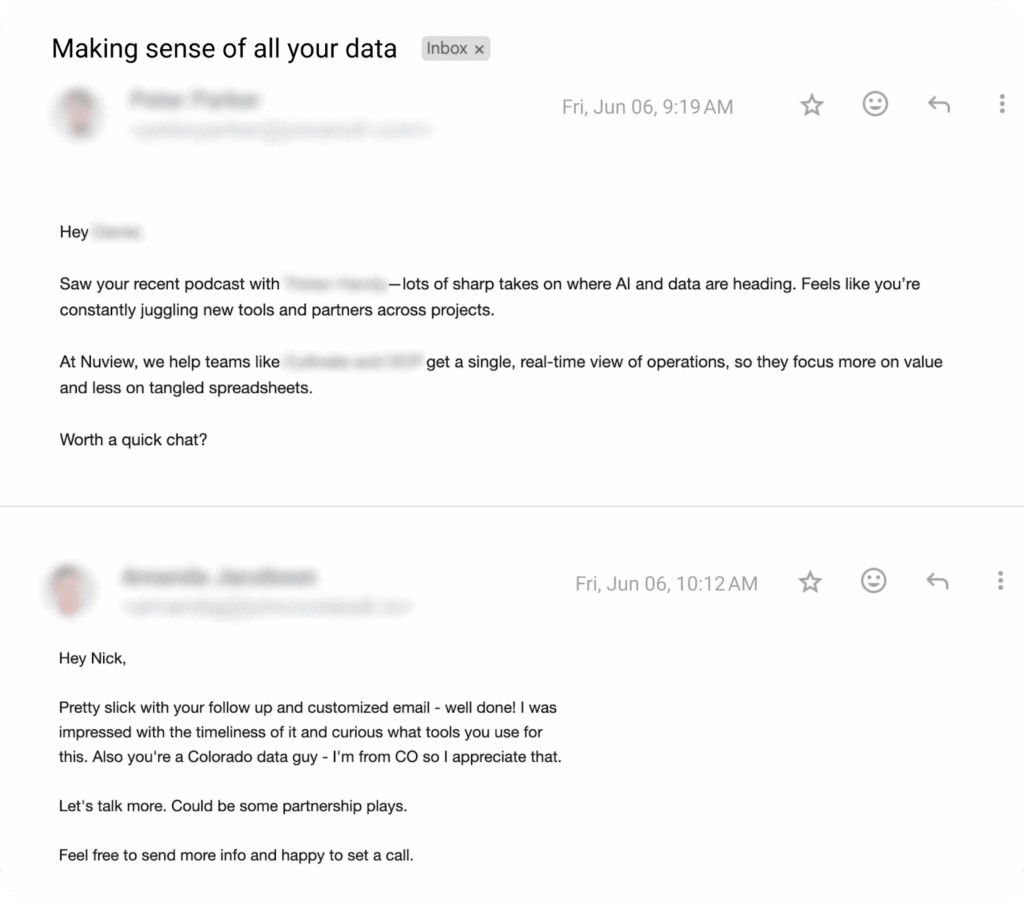
If you want to see other messages that booked meetings with names like Netflix, Boeing, and Pfizer, check out our wall of messages.
Subscribe to our Newsletter
FAQ
What is an AI email assistant?
An AI email assistant is a tool that automates parts of, or all of, your email workflow to save time and improve communication quality. Depending on the platform, it can draft emails, summarize long threads, triage your inbox, generate replies, research contacts, or schedule meetings. More advanced assistants like AiSDR also handle outreach messaging, context-driven replies within minutes, and intent-based sales outreach.
How much time can I save with an AI email assistant?
Most professionals using AI email tools save 5-7 hours per week on average, though the exact amount depends on your email volume, role, and how often you use the tool.
Here’s what the research shows:
- SAP’s 2025 study found employees save an average of 5 hours per week (52 minutes per day) using AI at work
- Microsoft research reported users spending 23-31% less time on email, saving 40-50 minutes weekly on reading and summarizing
- The London School of Economics found users save 7.5 hours per week, jumping to 11 hours with proper training
Context matters: Knowledge workers spend 12.5 hours per week on email (McKinsey), so even modest time savings add up quickly. Sales teams using outbound automation tools like AiSDR see even greater gains by eliminating hours of manual prospecting and follow-up work.
Do these tools integrate with my existing email and CRM systems?
Yes. Many assistants in the list work directly with Gmail or Outlook and connect with major CRMs. AiSDR offers a native HubSpot & Salesforce integration with automatic syncing of leads, scoring of accounts, and contact activity. Lavender integrates with Gmail, Outlook, HubSpot, and Apollo. Other tools like OneShot and Qualified also support syncing messages and lead data into CRM workflows.



Find out which are the best AI email assistants
 Summarize with
 ChatGPT
 Claude
 Perplexity
 Grok
Grok 
 Google AI