AiSDR Product Spotlight #44: Build sales personas on-the-fly right from the Campaign Builder

In sales, speed is everything.
The faster you can launch, test, and refine campaigns, the more chances you have to connect before opportunities slip away. In fact, research shows that leads contacted within 5 minutes are 8x more likely to convert. Even from our own experience, we’ve seen time and again that the first company to respond often seals the deal.
That is exactly what AiSDR is built for: Helping teams run faster, smarter sales outreach by automating the busywork and cutting the clutter. When everything moves at the speed of AI, results follow.
Still, even the smartest sales tools can hit snags if the workflows feel clunky.
Maybe you’re bouncing between tabs just to create a persona while building a new campaign. Maybe the buttons you need are hidden at the very top of the page while you’re halfway down editing. Each of these moments seems small, but together they chip away at momentum.
We know we promised more UI updates for the first week of October, but we decided to give you even more.
So, get ready for a double drop.
Now you can…
🤖⚒️ Create personas right from Campaign Builder
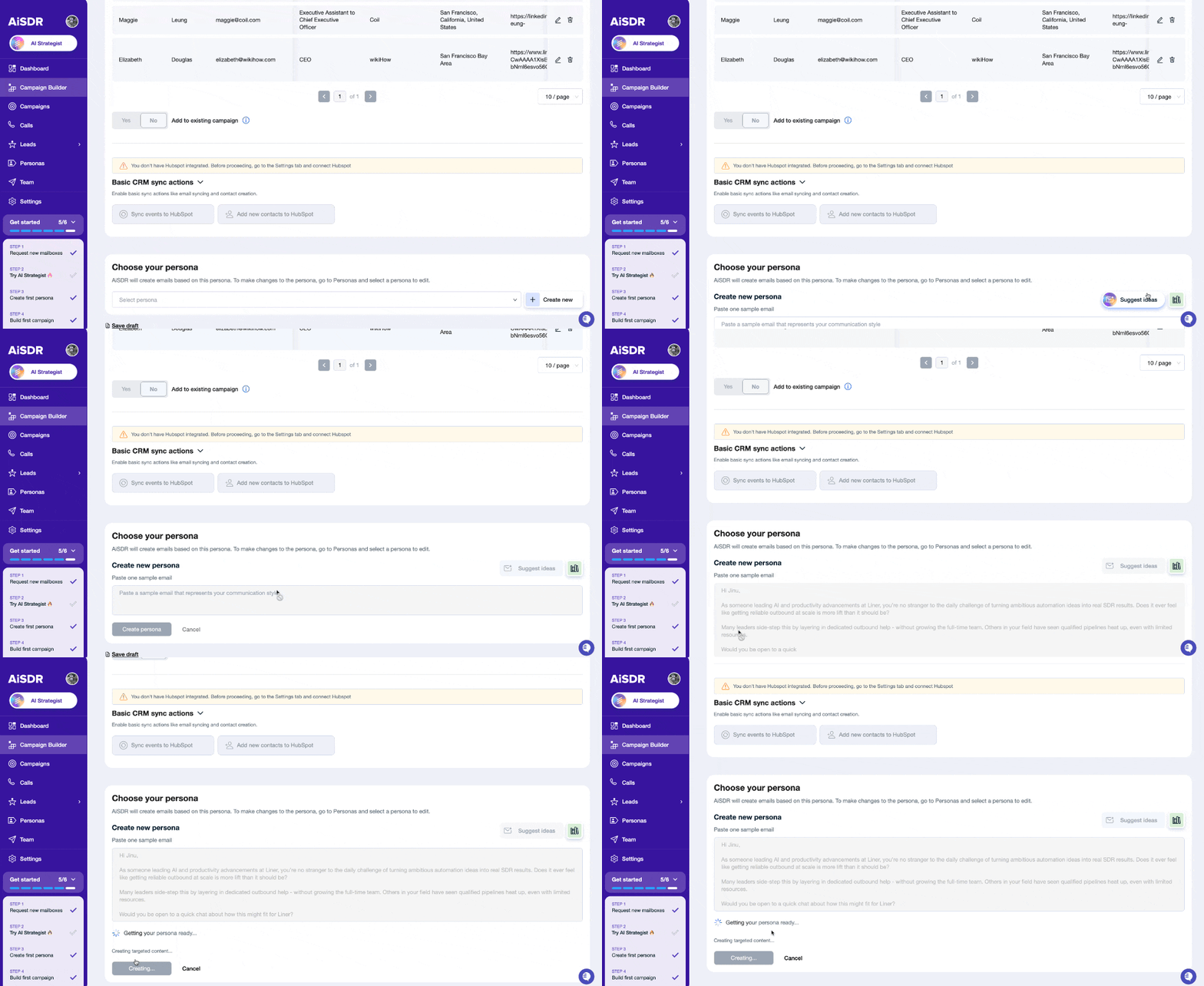
Personas are the backbone of smart outreach. They help you adapt tone and positioning for different audiences without reinventing the wheel each time. But until now, persona creation in AiSDR meant leaving the Campaign Builder, breaking your setup rhythm, and coming back later.
Not anymore.
With on-the-spot persona creation, you can spin up a new persona directly inside the Campaign Builder:
- Paste an email example to tune AiSDR to the framework or tone you want.
- Use ‘Suggest ideas’ to generate a persona on the fly.
Why it’s a game-changer
- Work faster: No need to switch tabs. Campaigns get launched sooner.
- Learn faster: A/B test multiple personas in one place and quickly see which messaging resonates.
- Scale smarter: Once you find the winning persona, apply it across campaigns to lock in higher reply rates.
Think of it as removing a speed bump from your sales highway. You stay in the zone, and campaigns move from idea to execution without losing steam.
✨ Sticky buttons & design upgrades
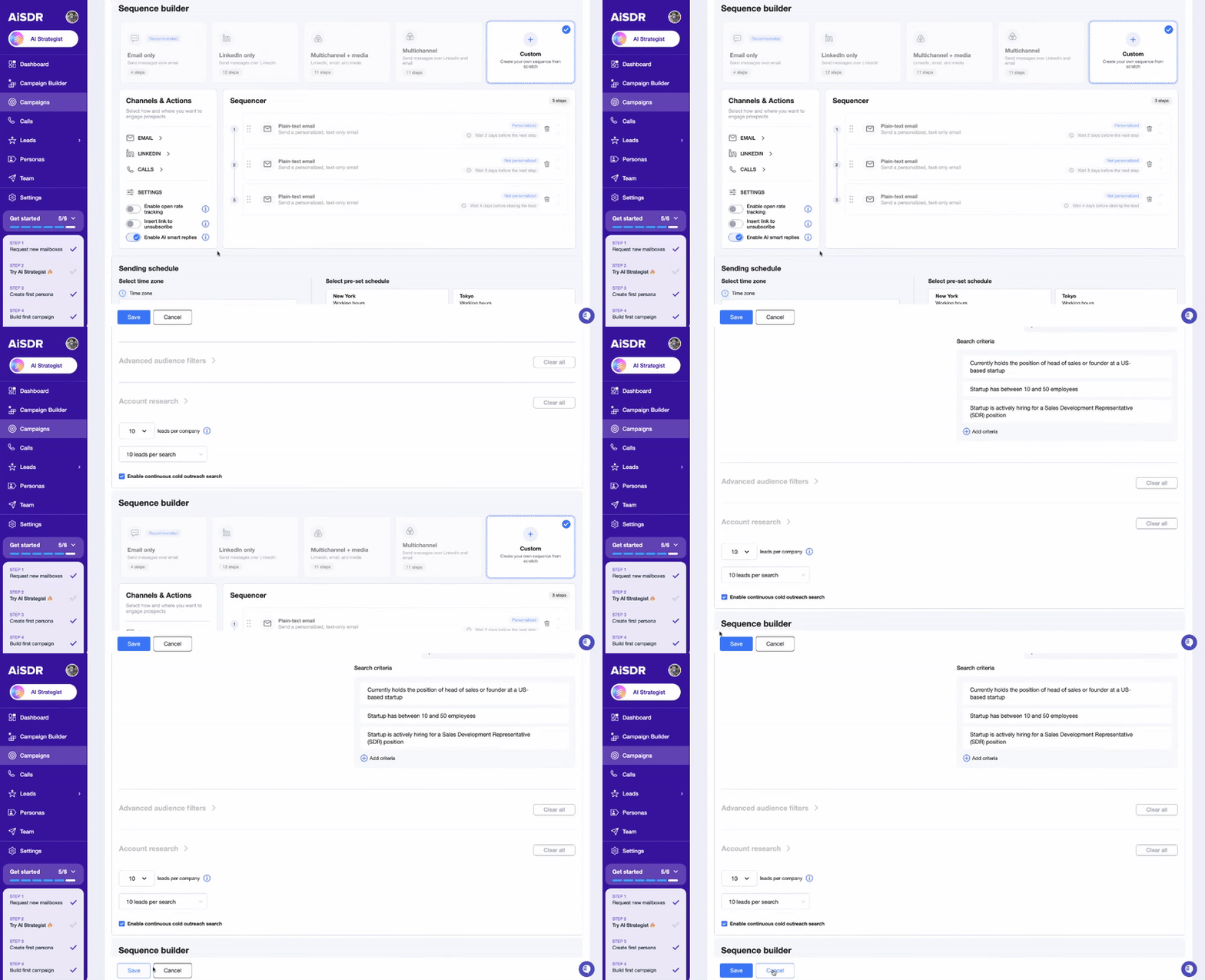
We’re not stopping at personas. Small UX improvements can mean the difference between a tool that’s merely usable and one that feels effortless. That’s why we’ve rolled out a series of UI enhancements to keep your campaigns on track.
Here’s what’s new
- Sticky “Save” and “Cancel” buttons so you can save progress without needless scrolling back and forth.
- The redesigned AI Strategist for smoother campaign planning.
- Smarter campaign bubbles so you can spot and manage campaigns at a glance.
Sticky buttons definitely lead the UI updates this week. They make the user experience so much more pleasant.
Imagine you’re halfway through building a campaign. You scroll down, edit messaging, tweak targeting… and then realize you need to save your progress. With the old setup, you had to scroll all the way back up. That doesn’t sound like much, but repeat it ten times in a day and suddenly it feels painful.
With sticky buttons, saving is always one click away.
Pair that with cleaner navigation and campaign bubbles, and the entire process feels lighter. It’s the kind of improvement you might not notice at first, but once you use it, you’ll appreciate it.
In short: less friction, more flow. Every tweak adds up to smoother campaign building and faster time to launch.
Next week’s sneak peek
October has only started, but we’ve prepared plenty more treats for you and a couple of useful tricks up our sleeves 👻 Stay tuned for more!
From idea to inbox, easier than you think 💡
Previous AiSDR updates:




See how you can build sales personas right from the Campaign Builder
 Summarize with
 ChatGPT
 Claude
 Perplexity
 Grok
Grok 
 Google AI