
AiSDR Product Spotlight #37: LinkedIn Profile Visitors

Where there’s a signal, there’s outreach.
On LinkedIn, intent signals often start as a quiet look at your profile. Someone from a company you care about takes a glance and moves on. The hint stays in one person’s notifications, out of reach for the team.
Traditional solution: Hunting down a name → Piecing together context → Guessing on fit.
Result: Time burnt + opportunity lost.

In an ideal world, you shouldn’t have to chase that lead in the first place.
That’s why with this week’s update, you won’t have to anymore.
Profile views you can act on
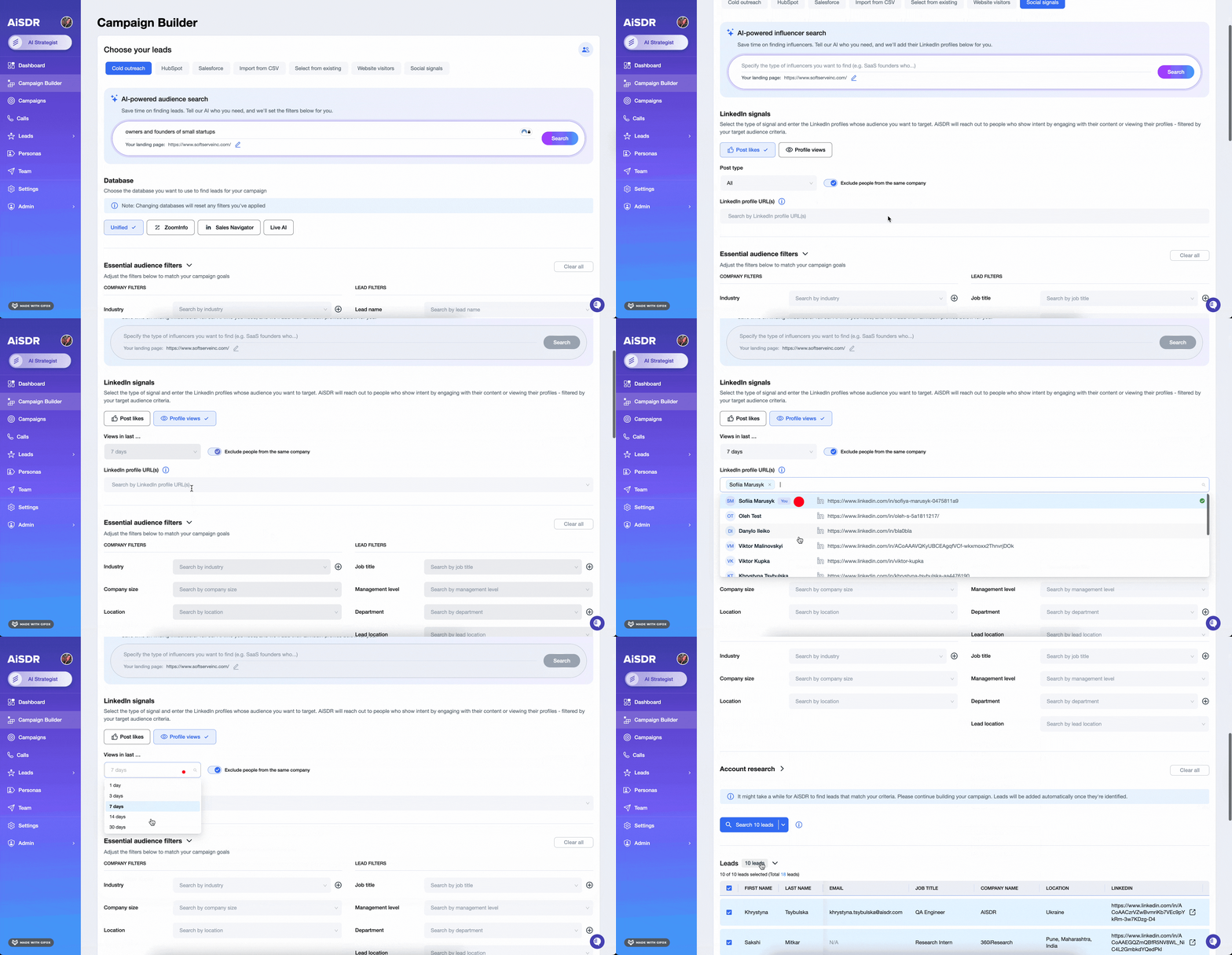
Someone checks your profile.
Now it becomes a lead in AiSDR with context. You can see the visit, qualify it, and follow up while attention is still fresh. And when your teammates connect their profiles too, those signals start flowing in together.
How it works
While this update is fairly straightforward, here’s how to get the most out of it:
- Connect your LinkedIn Premium account – Visit Integrations → LinkedIn Profile Visitors and connect with your Premium account. AiSDR will start pulling new visitors to your profile from the moment you connect.
- Share the signal across the team – Invite teammates to connect theirs. You’ll instantly expand the surface area of tracked interest.
- Filter for fit – Use Social Signals like job title, department, location, and seniority to capture only the visits that match your ideal customer.
- Strike while interest is high – Add qualified contacts to lists or sequences. Or reach out directly on LinkedIn while you’re still top of mind.
This provider captures data only. If you want to message or connect, keep your LinkedIn outreach integration connected. A new LinkedIn Connection integration is coming soon to simplify the handoff.
Why it’s cool
You catch the signal before it slips away. Outreach feels more natural because you’re meeting people at the exact moment they’re curious. And when the whole team can see and act on that interest, it stops being a missed opportunity.
Like when a VP from a target account checks your profile the morning after your webinar: a few hours later, the visit shows up in AiSDR already matched to their company and role. You loop in your AE and send a message while the topic is still top of mind. The conversation gets going forward without delay.
That is the kind of timing that converts curiosity into pipeline.
Where it helps most
Every LinkedIn view is a potential conversation starter, so the possibilities are endless (in the figurative sense, of course).
Here are a few ways teams are already using it to jump on real-time signals:
| Scenario | How you use it |
| Your profile sparks interest | A VP from a target account views your profile. You spot the visit in AiSDR and send a short, relevant opener while it’s still top of mind. |
| Your post drives a spike | Multiple people from the same company check your teammate’s profile. You flag the account, surface key titles, and coordinate your outreach. |
| Your customer’s company expands | A new finance contact visits your CSM’s profile. You loop in the team, share context, and explore an expansion opportunity. |
| Your campaign builds local heat | A cluster of Berlin-based views appears. You tailor the message, localize the approach, and sequence it into the region. |
Start small and move with the signal
You don’t need a full team or dozens of profiles to start seeing value. Even with just one or two connections, you’ll see profile visitors appearing in AiSDR as potential leads to reach out to.
Imagine you connect two LinkedIn profiles.
The next day, new visits start showing up. Most are expected, but a few are surprising. You begin with broad filters like department and location to keep things open and learn what kind of traffic you are getting.
Then a visitor catches your eye.
Right role, right company.
You add them to a campaign and test two openers: One mentions the profile view. The other ties into a recent post.
You send both, and one gets a reply.
Now you know what works. And you’re ready to double down.
🤫 Next week’s sneak peek
No more chasing LinkedIn profile visitors. They’re already in your database. And for next week, we’ve prepared something even more amazing 😉Stay tuned!
👀 Got profile visitors?
Previous AiSDR updates:




See who viewed your LinkedIn profile and act on those visits from inside AiSDR
 Summarize with
 ChatGPT
 Claude
 Perplexity
 Grok
Grok 
 Google AI