AiSDR Product Spotlight #36: In-app support widget

Sales outreach is a game of timing, speed, and precision. Teams win when they stay in the flow, moving from idea to execution without losing focus.
This flow is especially fragile when you’re setting up your first campaigns. Questions about filters, lead fit, or sequence settings can appear at any moment.
Sure, you can reach out to your GTM engineer or check the Knowledge Base, but that still means leaving the platform and breaking your focus.
And that’s the hidden cost. Some studies show that every time you switch tasks, you burn up to 23 minutes.
That’s selling time you don’t get back.
This all changes today.
Pylon widget: Support that lives inside your workflow

Now, Pylon-powered support lives right in your account as a widget.
Get help when you need it without switching tabs
Onboarding is smoother when help appears where you work. The widget gives you in-app guidance in real time so you can learn as you go, including:
- Workspace and permissions – Invite teammates, assign roles, and configure organizational settings
- Integrations and data – Connect your CRM, map fields, import CSVs, delete duplicated records, and set sync direction
- Messaging and sequences – Create templates with variables, align on tone, and set steps, delays, schedules, and quiet hours
- Compliance, deliverability, and reporting – Set sending domains and signatures, manage opt-outs and safe limits, handle bounces and replies, and see where results live
One widget you can go to for everything
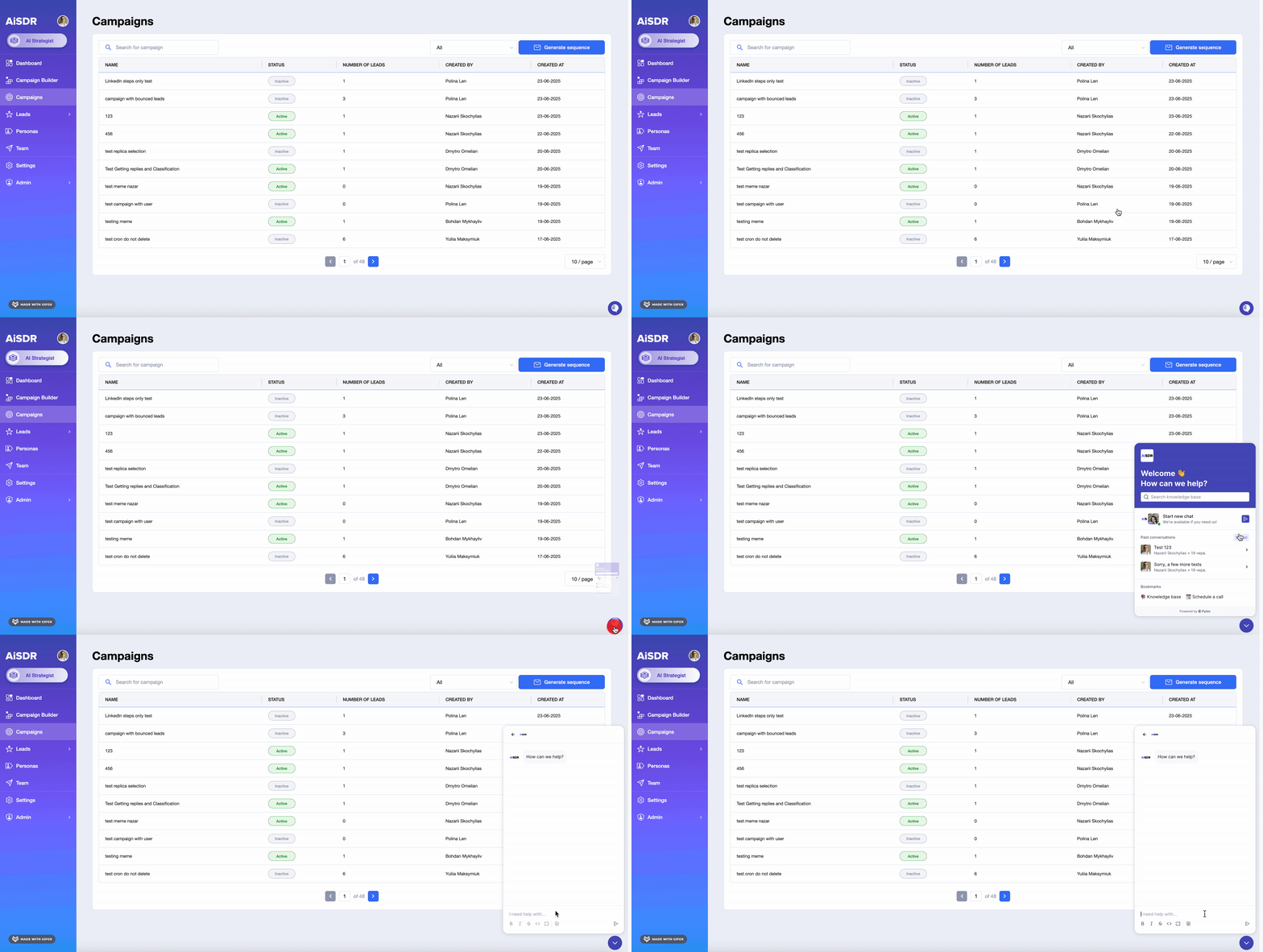
Next time you’re in AiSDR and need help or want to ask a quick question, look for the widget in the bottom-right corner.
This is your direct line. Just click it, and you’re in.
Chat directly with your GTM engineer
If you want to contact your GTM engineer, you can do it through the widget for situations like:
| Situation | You might ask… |
| You’re setting up a social signals campaign and deciding whether to target people or companies | “I’m setting up a social signals campaign. Which should I target for this goal and why?” |
| You’re tuning filter logic and want to confirm the scope | “Will this include Directors in EMEA and exclude Managers, or do I need an additional condition?” |
| You’re reviewing leads and you see certain companies you want to exclude | “Is there a way for me to upload a suppression list?” |
Book a call if you need
If a message isn’t enough, you can request a walkthrough for deeper, real-time help:
- Pre-launch campaign review and ICP refinement
- Sequence structure and pacing recommendations
- Troubleshooting deliverability and reply handling
Pull up articles from our Knowledge Base
And in case you prefer to explore on your own, you can check the Knowledge Base for:
- Targeting accounts versus contacts
- Filter logic examples for multi-region campaigns
- Field mappings and sending limits best practices
Why it’s cool
Before, getting help meant leaving the platform to message your account manager via email or Slack, or going through the Knowledge Base for an answer.
Now you have an expert right where you are. Someone who knows your account, your campaigns, your workflow, and can tell you what you need to know so you can shorten your time to value.
And if the answer already exists, the Knowledge Base surfaces it instantly, so your team can keep moving without waiting.
It is efficient, contextual, and built to help you make the right decisions at the right time.
Where it helps most
Outreach campaigns are the result of a long chain of decisions. You can go to the support widget whenever you hit one of these moments, such as:
- Pre-launch gut check – You’re finalizing a campaign and want confirmation on filter logic. DM your GTM engineer in the moment and launch with confidence.
- Lead review in context – Something seems off as you’re scanning through leads. Get a second look without leaving the page you’re working on.
- Faster onboarding – A new teammate is building their first campaign. Ping a quick question or check the Knowledge Base without breaking the flow.
- Time-sensitive tweaks – Targeting needs an adjustment midway through. Book a short call and resolve it before it slows the team.
- Self-serve clarity – For frequently asked questions, check the Knowledge Base and keep moving.
🤫 Next week’s sneak peek
You’re now just a click away from in-app support to help you with any pressing questions. Summer’s wrapping up, but stay tuned because we’re about to close with some HUGE updates 😉
Help when you need it, meetings when you want them 📆
Previous AiSDR updates:




Get the answers you need when you need them, right inside AiSDR
 Summarize with
 ChatGPT
 Claude
 Perplexity
 Grok
Grok 
 Google AI